

Marketing & Communications
March 26, 2026
Recipe: Group Your Campaigns for Clearer Reporting
# campaigns
# recipes for success
Get a deeper understanding of your email performance and the ways your customers interact by tagging and categorising your campaigns.
By analysing data across multiple campaigns rather than individual ones, you can dive deeper into the behavioural patterns of your customers to continuously improve the content you create and the way your organisation communicates.

What you need
- Access to build email campaigns in Dotdigital
- Access to the Insights and Mailings Interface in Spektrix

Time required
Prep time: 5 minutes
Cook time: 2 minutes (per campaign)

What will this help me achieve?
- Analyse the performance of your email marketing in a more meaningful way.
- Identify patterns, compare strategies across departments, and understand which types of content drive engagement with different audiences.

Concepts we'll be using
- Mailing Categories: Mailing Categories can help you to easily identify the purpose of the Mailing and group together different Mailings for reporting.
- Campaign Tags: Campaign Tags in Dotdigital help you group multiple Campaigns for reporting purposes.

Prep
- List all of your organisation’s departments or business functions (e.g. Fundraising, Box Office, Education).
- List all of the type of mailings you send (e.g. Season Launches, Monthly Newsletters, Pre Event Emails).
- List all of the types of content you use in your campaigns (e.g Video, Interviews, Previews).

Activate
- Use Spektrix mailing categories to record who owns the mailing by defining the department owner.
To set up Spektrix Mailing Categories:
- In Spektrix, go to Insights and Mailings > Mailings > Mailing Settings > Custom Mailing Categories.
- Create new mailing categories which represent your organisation’s internal department structure.
- Use Dotdigital campaign tags to record what the context and content of the email campaign is.
Set up Dotdigital campaign tags:
- In Dotdigital, go to Campaigns > Email, and select the Sent or Unsent tab, to locate the campaigns you want.
- Check the boxes against the campaigns you want to apply tags to.
- Expand the MORE ACTIONS dropdown menu and choose Manage campaign tags.
- In the Manage tags side panel, click SELECT CAMPAIGN TAG, and then either:
- Select an existing tag Select the radio buttons for the tags you want to apply. Hold Ctrl on your keyboard to select multiple tags.
- Create a new tag Enter a name for your tag and click APPLY.
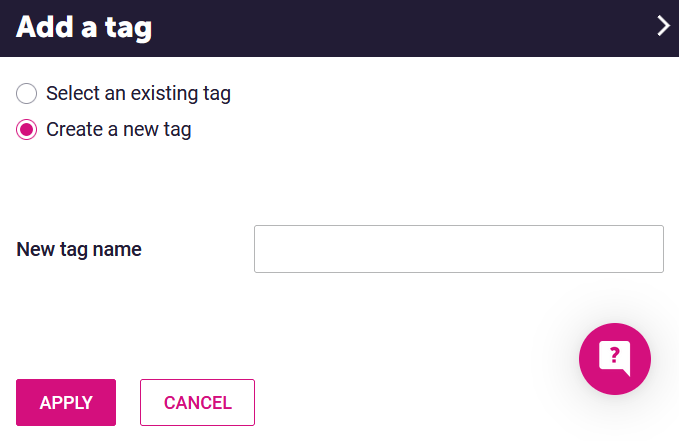
- The side panel displays the tags you have chosen and the number of campaigns they are to be applied to. Select APPLY.
TIP: You can also add tags when setting up new Campaigns. This is done on the Campaign Details page where you add your subject line and Friendly from name.
Analyse your email campaigns to extract data which will inform your future activity.
- In Spektrix, use a customer list with a mailing segment to filter by mailing category. Your mailing category tells you who is sending emails and how often. Look at patterns such as:
- Which departments are sending the most communications
- How frequently customers are hearing from each team
- Whether engagement differs between departments.
This can help you understand your overall communication cadence and volume. For example, whether audiences are receiving multiple emails from different teams in a short period, or whether some departments consistently achieve stronger engagement.
- In Dotdigital, use the email campaign report filtered by tag to understand what kinds of emails perform best. To report by campaign tag in Dotdigital, go to Analytics > Campaigns:
- Select DATE RANGE in the top right of your screen and select the Filter by tag radio button.
- Expand the Show all drop-down menu and select the tag you want to view.
- Select APPLY.
Because you can apply multiple tags to each campaign, you can start comparing performance between different types of content and contexts. For example, you might compare pre-show emails against marketing campaigns or look at whether emails that include video generate higher engagement. Over time, these comparisons help you understand which formats and content types your audiences respond to most strongly.

More to explore
By understanding which types of emails, content formats, and campaign contexts generate the strongest engagement, you can make more informed decisions about what to send, how to structure your messages, and which approaches are most effective for your audiences. Over time, this allows you to refine your email strategy based on evidence.
Comments (0)
Popular

Table Of Contents
Popular
Dive in