

Marketing & Communications
April 13, 2026 · Last updated on May 6, 2026
Recipe: Automate Your New Member Welcome
# Recipes for success
# Emails
# Marketing
# Memberships
# Fundraising
Makes: A welcome email which will be automatically delivered daily to brand new members

What you need
- Admin access to the insights & mailings interface
- An active membership in Spektrix
- A Dotdigital email campaign designed to welcome new members

Time required
- Prep time: 25 mins
- Cooking Time: 35mins

What will this help me achieve?
- Acknowledge your members and make them feel valued as soon as they join
- Encourage members to make the most of their benefits
- Automate part of your communication to members

Concepts we'll be using
- Auto tags : a label which can be dynamically applied to customer records based on the criteria you have set.
- Local segments : used in customer lists and auto tags to group customers together based on shared characteristics.
- Customer list schedule : a way of scheduling a customer list to generate at a specific time. Can be used to deliver an integrated email campaign.

Prep
- Record how much time you currently spend welcoming your members (e.g sending out welcome packs or bespoke communications).
- Define your brand new member criteria for the auto tag. We’ll be focusing on new members. Consider if you want to include or exclude certain membership levels.
- Set up an email campaign in Dotdigital. Highlight any membership benefits and show appreciation for their support, including what their support means for your organisation.
- Check if you already have a synced tag group . If not, you’ll need to set one up.

Activate
- Create an auto tag in your synced tag group. Create a new local segment and select purchasing segment. From the membership wrapper, drag in the date transaction confirmed metric and set the criteria to yesterday. Using the and box, drag in the first ever membership metric and check box:
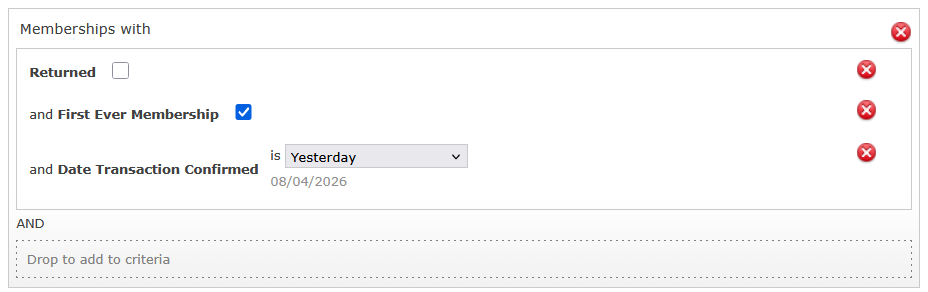
Optionally, you can also filter by channel (e.g. online only) or limit the tag to a specific membership or membership amount.
- Build a customer list using the new member auto tag and include any relevant segments for your organisational contact preferences.
- Create a new customer list schedule. Attach your customer list and select the email campaign you created earlier. Schedule your customer list to deliver your email campaign daily so that each member is guaranteed a timely welcome.
Try this twist

Say thanks to new members immediately by using confirmation text attributes in your plain text confirmation emails. This quick fix reduces initial inquiries while the automation runs on a daily schedule.
You can also use your new member auto tag to power dynamic content in this welcome email. For example, you could include a tailored content block that returns membership benefits based on the level of membership in the auto tag. All those new auto-tags could be included in the single customer list that powers the automated email.

More to explore
Once you have automated your welcome emails, take a look at these ideas to further streamline your membership communications and save your team valuable time.
- Consider setting up a Dotdigital program to continue to engage with your members.
- Design a similar email to welcome members who are not new to you, but to a new membership level. Test a new auto tag, exclude your new members and use the first of this membership metric to identify upgrades.
Comments (0)
Popular

Dive in
Related
Recipes and Toolkits
Recipe: Analyse the Success of Your Member Recruitment Drive
Apr 13th, 2026 • Views 97
Recipes and Toolkits
Recipe: Analyse the Success of Your Member Recruitment Drive
Apr 13th, 2026 • Views 97