

Marketing & Communications
April 6, 2026
Recipe: Split Test Email Links to Drive More Clicks
# Emails
# Marketing
# Recipes for success
Maximise ticket sales or donations by testing your call to action (CTA) placement and wording to drive more clicks

What you need
- Access to build email campaigns in Dotdigital
- Version A of your email campaign with your standard email layout or CTA

Time required
Prep time: 20 minutes
Cook time: 2–4 hours (automated testing window)

What will this help me achieve?
Identify which specific link, button, or placement drives the most engagement from your customers. This recipe will empower you to stop guessing and start using data to make design decisions.

Concepts we'll be using
- Split Test: Also known as an A/B test. Measures the performance of two variables in your email to see which works best for your audience.
- Clicks: a metric measuring the total number of times users interact with a button, link or content piece by clicking it, signifying direct engagement.

Prep
- Create the initial version of your email campaign in the easy editor. This will be Version A. Once complete, click the Create link from the breadcrumb menu to go to the campaign details page.
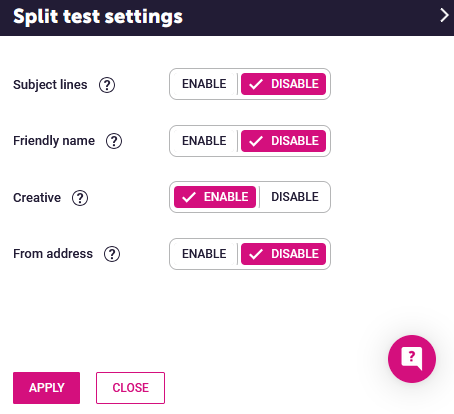
- On the campaign details page of your email campaign, select SPLIT TEST SETTINGS and ENABLE for creative:
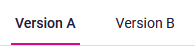
- In the easyeditor, you will now have a Version A and a Version B of your email campaign:
- Click into Version B and edit the campaign. We recommend changing only one or two key components of the email to be able to get the most insight from the test. For example, you might want to change the placement or message of the call to action.

Activate
Create a new integrated email in Spektrix. When you select your email campaign ,you will be presented with options for the test:
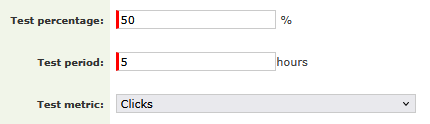
- Test percentage is the percentage of contacts to be included in the test. If the test percentage is set to 50%, then 25% will get version A and 25% will get version B of the campaign. The remaining 50% of your selected audience will be sent the winning version once the testing period is finished.
- The test period is how long the test will run, in hours.
- The test metric is how the winner of the split test is determined. Choose clicks.

More to explore
After the winning version has finished sending, check the heatmap section of the Email Campaign Report in Dotdigital. This will give you a visual representation of where people clicked, helping you plan the most optimal layout for your next campaign.
Comments (0)
Popular

Dive in
Related
Recipes and Toolkits
Recipe: Split Test Subject Lines to improve Email Open Rates
Apr 6th, 2026 • Views 99
Recipes and Toolkits
Recipe: Analyse the Success of Your Member Recruitment Drive
Apr 13th, 2026 • Views 97
Recipes and Toolkits
Recipe: Group Your Email Campaigns for Clearer Reporting
Mar 26th, 2026 • Views 110
Recipes and Toolkits
Recipe: Split Test Subject Lines to improve Email Open Rates
Apr 6th, 2026 • Views 99
Recipes and Toolkits
Recipe: Group Your Email Campaigns for Clearer Reporting
Mar 26th, 2026 • Views 110
Recipes and Toolkits
Recipe: Analyse the Success of Your Member Recruitment Drive
Apr 13th, 2026 • Views 97