

Marketing & Communications
May 15, 2026
Recipe: Identify and Reward Your Top Bar Spenders
# dotdigital magic
# recipes for success
Makes: An auto tag that identifies high-value EPOS customers to power targeted Dotdigital marketing campaigns.
Secondary spend is a vital revenue stream that is often separate from other income sources. By connecting your EPOS (Electronic Point of Sale) data with Spektrix, you can see the full picture of customer value beyond the ticket price.
Using auto tags is a powerful way to help in handling this data. Tags act as identifiers within Spektrix; once a customer is tagged based on their spend, you can use that tag to build dynamic customer lists that sync directly to Dotdigital. This recipe creates a seamless customer journey from making a bar transaction to receiving a personalised marketing email.

What you need
- Access to the admin and insights & mailings interfaces
- An integrated EPOS system
- A Dotdigital account

Time required
- 25 minutes

What will this help me achieve?
- Increase revenue: Identify high-value customers for premium upsells and rewards
- Audience relationships: Automate personalised communications based on customers' behaviour at your venue.
- Saving time: Create a workflow that automatically moves customers in and out of marketing lists.

Concepts we'll be using
- Auto tags: a label which can be dynamically applied to customer records based on the criteria you have set.
- Tools in Spektrix used to create discounts or incentives based on eligibility, such as:
- Offers
- Customer list schedules: a way of scheduling a customer list to generate at a specific time. Can be used to deliver an integrated email campaign.

Prep
- Define your threshold: Determine the spend amount (for example, £100 in the last month) that qualifies a customer as "high value".
- Sync Check: Ensure that your EPOS data is correctly flowing into Spektrix as orders. Check with your EPOS provider if you are unsure.

Activate
Step 1: Create the auto tag
- Navigate to admin interface > customers > tags.
- Choose a tag group and create a new auto tag.
- Give your auto tag a clear, descriptive name such as “High Value Bar Spender” and add a description.
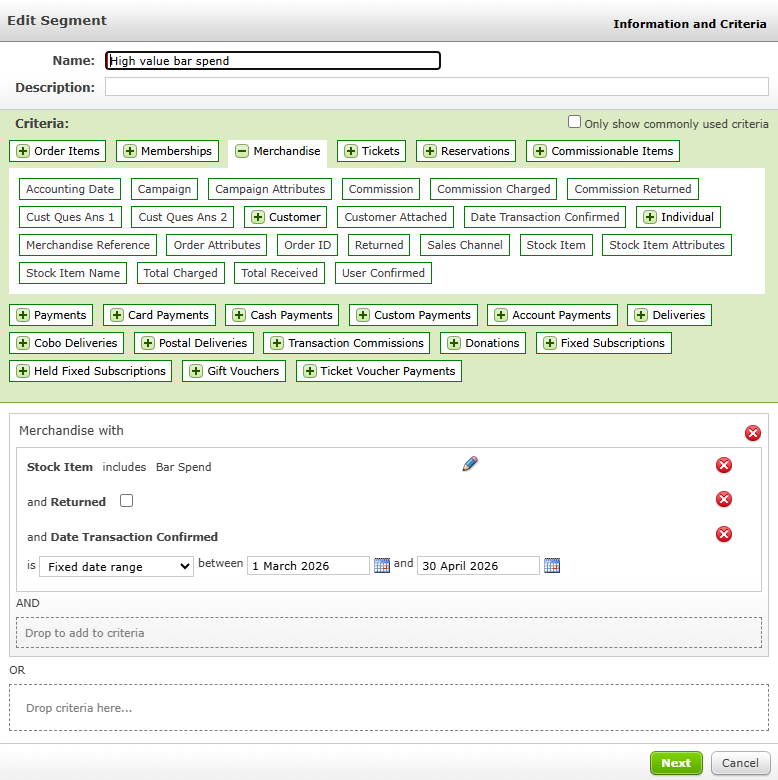
- Create a purchasing segment with the following:
- Merchandise wrapper: merchandise items used in the EPOS integration.
- Merchandise wrapper: date transaction confirmed with your desired date range.
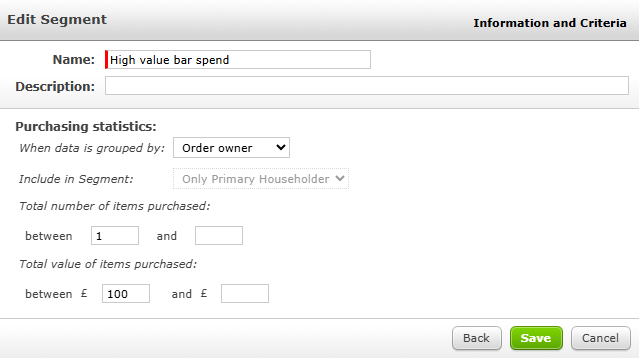
- Click next and then define your segment. Under purchasing statistics, set the total value purchased to your threshold, for example, between $100 and blank.
Step 2: Set up the reward
- This can be:
- An offer - in Spektrix or your EPOS system
- Lock type eligibility
- Priority booking
- Set up the reward of your choice in the admin interface (or your EPOS system)
- Under eligibility, select tag and choose your "High Value Bar Spender" tag.
- Set the reward to be active/available online so customers can redeem their reward immediately.
Step 3: Create the email
- In Dotdigital, create an email campaign with a message for your loyal customers.
- Include a clear call to action encouraging customers to claim their reward.
Step 4: Set up the customer list schedule
- In the insights & mailings interface, create a customer list using the following criteria:
- The auto tag you created earlier
- Your email contact preference
- In the customer list schedules tab, set up a schedule that sends an integrated email at your desired frequency. Select the email campaign from the previous step.
Once complete, you’ll have an automated process that:
- Compiles a list of eligible customers
- Sends an automated email informing them of the reward
- Automatically applied eligibility for the reward - customers only need to log into their account to access it.

Try this twist
Take it to the next level with a lapsed spender campaign. Add a purchasing segment using NOT logic to find customers who have the high value spender tag but haven't made a purchase in the last 3 months. Then, use a customer list schedule to set up an automated email to target these customers with a "we've missed you" email.
Interested in customers who purchase specific items? You can use a purchasing segment > merchandise wrapper > the merchandise reference metric to find customers who purchase specific items. You might want to use this data, for example, to contact customers who purchase interval drinks with an interval drink offer or update.

More to explore
Once you've automated your high-spender marketing, you'll be able to increase retention and lifetime value with your marketing strategies for ticket sales. For more inspiration, take a look at:
Comments (0)
Popular

Table Of Contents
Dive in