

Marketing & Communications
April 6, 2026
Recipe: Identify and target loyal customers
# marketing
# recipes for success
Leverage booking frequency data from Spektrix by identifying your loyal customers and targeting them with relevant communications and offers to drive ticket sales and strengthen audience relationships

What you need:
- Access to the admin and insights & mailings interfaces in Spektrix
- Access to your Dotdigital account

Time required:
20 minutes
What will this help me achieve?
- Increase ticket sales and revenue by focusing marketing on high-value customers.
- Strengthen audience relationships by ensuring your most loyal bookers feel valued.
- Find lookalike customers to encourage loyalty and drive revenue.
- Improve efficiency internally with automated lists and emails for FOH and marketing.

Concepts we'll be using
- Auto tag: A dynamic tag applied to a customer record based on a set of criteria which updates automatically.
- Reattendance Analysis Report: A standard report in Spektrix used to analyse the average frequency of attendance across your entire audience.
- Customer Segment Stats Report: A Spektrix report used to highlight top level stats about the customer group selected, such as average number of events attended, average donation amount and average spend. Use in conjunction with a customer list to decipher information about a select customer segment/s. If you do not have this report on your system, request it from our support team.

Prep
- Define loyalty: Determine your organisation’s metric for loyalty. For this recipe, we will use booking frequency. You can substitute this for your own definition of what loyalty means to your organisation.
- Find your loyalty threshold: Run the reattendance analysis report in Spektrix to find your organisation's average attendance frequency. Record this average. Customers whose frequency is above the average can be defined as loyal customers.

Activate
- Navigate to the admin interface > customers > tags
- Create an auto tag which will apply to customers with a booking frequency above your average.
For example, if your average customer attends twice a year, set your auto tag criteria using a booking segment > date > relative date range > in the last 365 days > Number of events attended 2 and above.
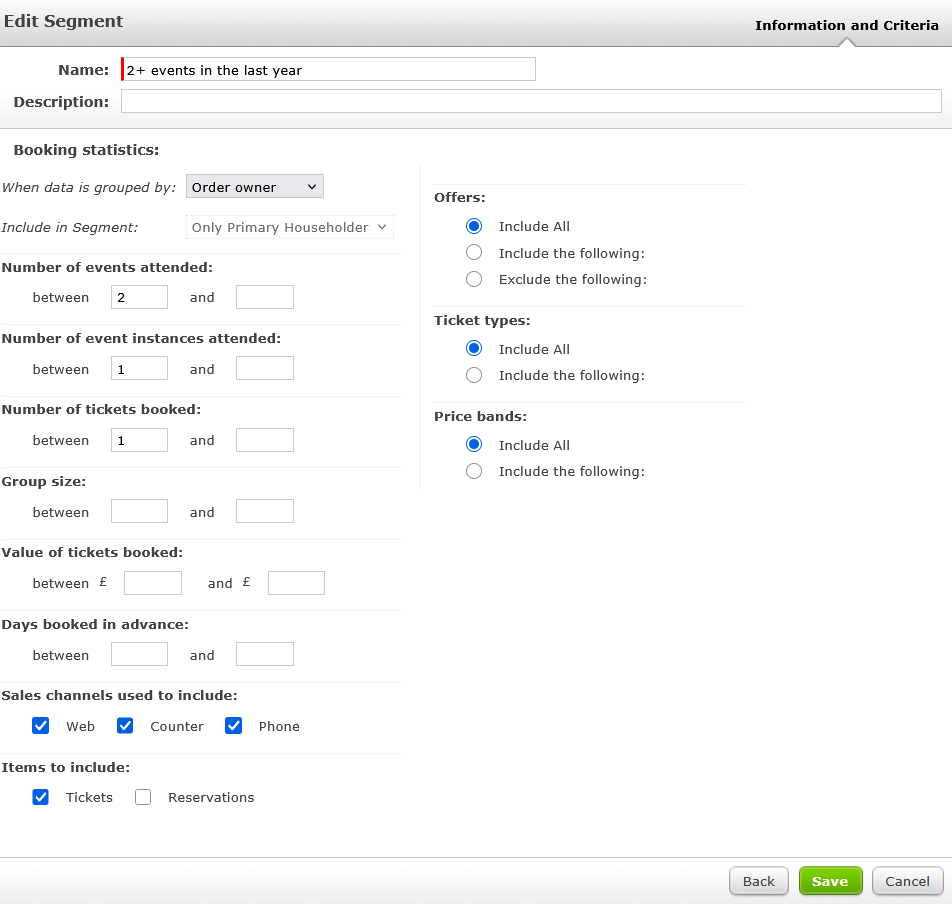
- Save the auto tag.
- You can now use this auto tag to target your loyal customers. For example:
- Send a targeted message or offer through Dotdigital.
- Add the tag to a customer group to flag loyal bookers for your front of house teams in the scanning interface.
- Combine with a potential member segment to target them with a membership ask.
Try this twist:
- Define extra-loyal, nearly-loyal: Create additional auto tags which represent more granular tiers of loyalty to further refine your communications.
- Identify loyal customer patterns: Create a customer list using your auto tag and run this through the customer segment stats report to find similar customers to engage.
- Target lookalikes in Meta: Use your loyal customer list to create a lookalike audience for targeted advertising on Meta.
- Gather feedback: Target this list with a feedback survey to build a deeper relationship with your most loyal customers.

More to explore
Once you've created a list of your most loyal bookers, you'll be able to personalise your communications and marketing strategies for both retention and growth.
Comments (0)
Popular

Dive in