

Marketing & Communications
October 31, 2025 · Last updated on March 14, 2026
Recipe: Dynamic Content for Potential Members

# emails
# campaigns
# segmentation
# recipes for success
Makes: A way to create personalized, high-impact email campaigns that speak directly to your potential members
This recipe shows you how to use dynamic content in Dotdigital to insert personalized membership messaging into your regular emails. By targeting customers who are most likely to convert, you’ll drive more meaningful engagement without needing to build separate campaigns. It's a scalable, efficient approach that supports growth in your membership program and deeper customer relationships.

What you need
- Data:
- A potential member auto tag
- A Dotdigital email campaign
- Key Messages:
- Information about your membership benefits
- Clear, persuasive reasons to support your organization
- Messaging that feels personal and timely
- Optional Extras:
- Member testimonials or images
- Time-sensitive offers
- Variations by membership level using additional auto tags

Time required
Prep time: 20 minutes
Cooking time: 30 minutes

What will this help me achieve?
- Target specific audiences with personalized messages
- Improve campaign performance without creating more emails
- Convert more supporters into members
- Establish a scalable model for future dynamic communications

Concepts we’ll be using
This recipe uses dynamic content in Dotdigital to tailor parts of your email to a specific audience—your potential members—without needing separate campaigns. By pairing this with an auto tag that flags likely members, you can insert messaging only these customers will see. It's a great way to make your emails more effective without doubling your workload.

Prep
- Set up your potential member auto tag
- Benchmark your current membership
- Run the Current Members standard report to record how many members you have before your campaign goes out.
- Define your goals
- Note what success looks like for this campaign—maybe a 5% increase in members or a specific number of new signups.
- Choose your campaign
- Add dynamic content to any regular email (e.g. newsletters, pre-/post-show emails).
- Craft your message
- Tailor it to your audience—e.g. highlight perks like bar discounts if you’re targeting frequent attenders.

Activate
- Add dynamic content in Dotdigital
- Edit your email campaign
- Drag in a dynamic content block
-

- Create a new variation
- Use your auto tag as the contact data field
-
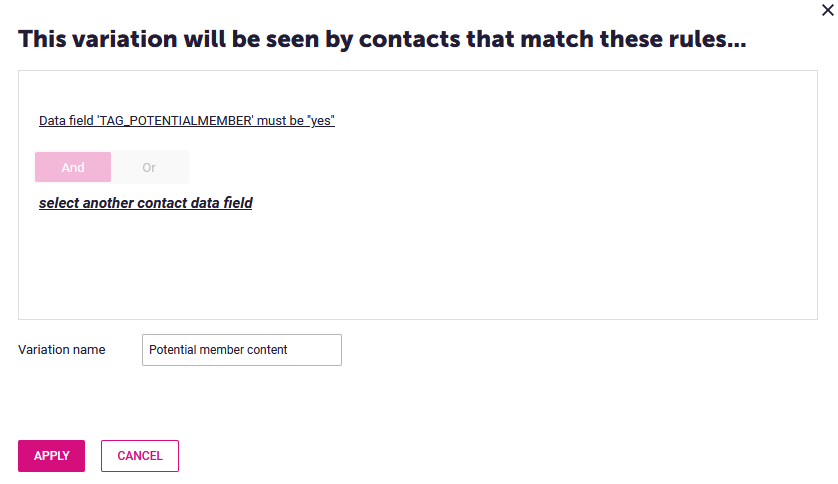
- Add your personalized messaging (text, images, etc.)
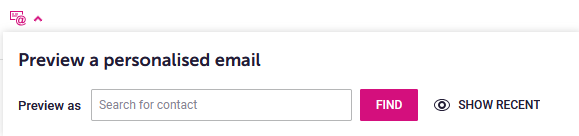
- Test your campaign
- Use Dotdigital’s preview tools to test how it looks for people with and without the tag
-
- Launch
- Save, schedule, or send your email
- Track performance and engagement using Dotdigital’s campaign reports
- Measure results
- After sending, run the Current Members report again to see how many new members you’ve gained
Comments (0)
Popular

Table Of Contents
Popular
Dive in