

System Setup & Tools
July 21, 2026

New look. Same Spektrix.
New look. Same Spektrix.
# Branding
# Navigate Spektrix
# Navigate Spektrix
# New at Spektrix
# Sales
# Working with us
# Working with us

Next week, we’re introducing a new look and feel for Spektrix.

Georgie Pepper
Georgie Pepper
New look. Same Spektrix.

New look. Same Spektrix.

Next week, we’re introducing a new look and feel for Spektrix.

ďťż
You’ll see the difference on our website, in our content, and at our upcoming events. Perhaps most importantly, you’ll see it in your system when you log into Spektrix from Monday 27 July.
This isn’t a reinvention. There’s no change to our values, mission, or commitment to your success. Nor is there any change to how Spektrix works – you’ll find all the same features in the same places, and they’ll work in the same way as before.
What has changed is the look and feel of the system. Many of you told us that Spektrix was starting to feel a little dated, and didn’t represent the company you knew us to be.
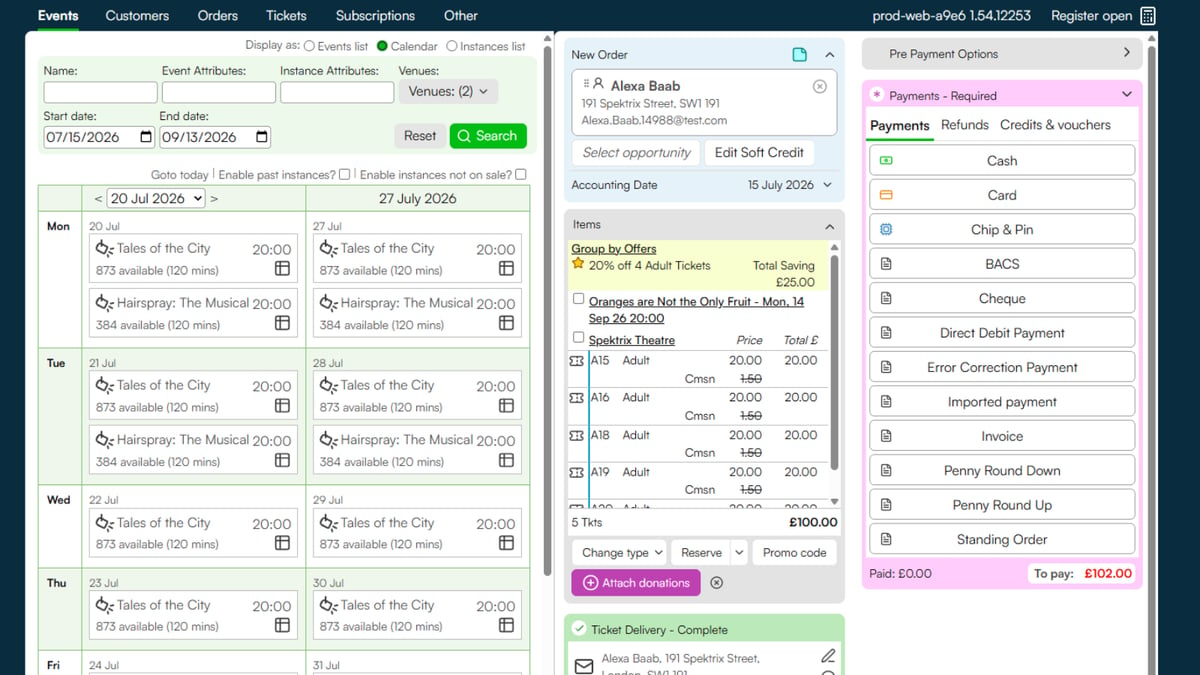
So today, you’ll get your first glimpse of a new-look Spektrix interface.
Whether you’re making a sale, planning your next campaign, or researching future donors, we hope you’ll find things a little cleaner to use.

What has changed?

Spektrix works as it always has. Buttons are in the same places and perform the same actions.
The user interface, or UI, that surrounds those buttons has had a glow up.
It’s designed to look a little fresher and cleaner, without removing any of the information you rely on. That means:
  • You’ll find the same information on the same screens as before
  • You’ll be able to complete every operation using the same journey as before
  • We hope you’ll find that many processes are even clearer and more intuitive than they were in our old UI.
We’re grateful to the organisations who have worked with us to test the new interface, let us know what works, and helped us build a new user interface that’s as good looking, robust, and intuitive as possible.

How we approached the redesign

We knew that our interface felt dated. We also knew that you valued the complete, single-screen view of each transaction, customer record, and pipeline.
That meant we wanted to deliver a fresher look with more clean space, without compromising the quality or visibility of information you can find in Spektrix.
With that in mind, we prioritised:
  • Keeping essential information on one screen
  • Reducing clutter without removing information
  • Balancing readability with density
  • Preserving familiar workflows - there will be nothing to relearn.

How to sell a ticket

One of the areas which has been most visibly refreshed is the basket or cart screen, where you and your teams complete ticket sales and transactions. We know that this is where many Spektrix users spend the majority of their time, often under the highest pressure, and we made this a priority for improvement.
Watch this short video to learn what has changed in the basket/cart screen, and what has stayed the same. Invite your team members to spend a few minutes watching this video before the box office opens, and they should quickly feel confident in selling tickets using the new-look Spektrix.
ďťż
ďťż
As you explore other parts of the system, you’ll find - just like the basket/cart screen - that everything works in the same way beneath the surface. It may take a moment to familiarise yourself with the new interface, but it will ultimately create a better experience for you and your team to explore existing and upcoming functionality.
We hope you enjoy exploring your new-look Spektrix!
ďťż

How to get the best performance from Spektrix

Spektrix works best with your monitor set to 100-125% scale.
If you’re working on a desktop computer, your monitor should default to 100% scale.
If you’re working on a laptop, it’s likely to default to 150%. You may find this constricts certain elements of the interface.
To adjust settings on a Windows device, search your computer for Display Settings.
Choose System > Scale & Layout > Scale
Set your scale to 100 or 125%. This will give you the best possible view of Spektrix, and of many other websites and systems you rely on.
ďťż

Questions?

As ever, we’re here to support you with any questions about the interface or any other aspects of Spektrix. Reach out to  [email protected]  for support, or join the conversation in the Spektrix Community.
Comments (0)
Popular
avatar
ďťż
Dive in

Related

Resources
New at Spektrix Roundup - September 2025
By Brittney Aston • Oct 1st, 2025 • Views 218
External Content
Spektrix Invoices
Sep 10th, 2025 • Views 0
External Content
Welcome New Team Members to Spektrix
Oct 1st, 2025 • Views 34
Resources
Spektrix eLearning
By Mal Ward • Jun 15th, 2026 • Views 37
Resources
New at Spektrix Roundup - September 2025
By Brittney Aston • Oct 1st, 2025 • Views 218
External Content
Welcome New Team Members to Spektrix
Oct 1st, 2025 • Views 34
Resources
Spektrix eLearning
By Mal Ward • Jun 15th, 2026 • Views 37
External Content
Spektrix Invoices
Sep 10th, 2025 • Views 0
Terms of Service
Your Privacy Choices